
Google Search Console Now Tracks YouTube, Instagram, TikTok & X
Google Search Console has traditionally been one of the most important tools for website SEO. It tells us which Google searches generate impressions and clicks, which pages attract organic traffic, and how a website performs in Google Search.
That definition has now become much broader.
Google has introduced Platform Properties in Google Search Console, allowing creators, businesses and digital marketers to measure how content published on YouTube, Instagram, TikTok and X is discovered through Google.
And the feature is now available globally.
This is an important change because Google Search Console is no longer restricted to analysing websites you own. Social media accounts and video channels can now become Search Console properties of their own.
What Are Google Search Console Platform Properties?
A property in Google Search Console has traditionally represented a website or part of a website.
For example, once you verify ownership of your domain, Google Search Console can provide information about:
- Google Search impressions
- Organic clicks
- Search queries
- Pages receiving traffic
- Search visibility trends
- Countries and devices
- Search appearance
- Indexing and other SEO information
Platform Properties extend this concept to third-party publishing platforms.
Instead of analysing only pages hosted on your own domain, Search Console can now analyse Google visibility for content published through supported social and video platforms.
At present, Google supports:
- YouTube
- TikTok
- X
Google initially announced Platform Properties on 7 July 2026 and confirmed on 29 July 2026 that the feature had become globally available.
This represents a significant expansion of what we traditionally think of as Search Console.
What Can You Measure?
Platform Properties are designed to answer an increasingly important digital marketing question:
How are people finding our social media and video content through Google?
Suppose you publish a YouTube video explaining a particular subject.
Someone searches Google for that subject and your YouTube video appears in the results. The user then clicks the video.
Previously, YouTube Analytics could tell you a certain amount about external traffic, but analysing this specifically from Google's search perspective was much more limited.
With a YouTube Platform Property in Search Console, you can analyse how Google is exposing that content.
The same concept applies to Instagram posts, TikTok videos and content posted on X.
Search Console can therefore help identify:
- Which content is appearing in Google
- Which search queries are generating visibility
- How many impressions the content receives
- How many people click through
- Which posts or videos are gaining Google visibility
- Which topics are trending upwards or downwards
- How content performs over different periods
Google says Platform Properties can provide visibility across Google Search, Discover and Google News.
That distinction is important. This is broader than simply measuring traditional Google Search results.
This Does Not Replace YouTube Analytics, Instagram Insights or TikTok Analytics
Platform Properties should not be confused with the analytics tools provided by the platforms themselves.
For example:
YouTube Analytics tells you what happens largely within the YouTube ecosystem - views, watch time, subscribers, audience retention, traffic sources and engagement.
Instagram Insights provides metrics such as reach, interactions, followers and engagement within Instagram.
TikTok Analytics provides its own views, engagement and audience information.
Google Search Console answers a different question:
How is this content performing when Google surfaces it?
The best approach is therefore not to replace platform analytics with Search Console.
Use them together.
Platform analytics tells you what happens on the platform.
Search Console tells you how Google users are discovering the content from outside that platform.
That combination can provide a considerably better picture of content performance.
Why This Matters for SEO
This update reflects something SEO professionals have been seeing for several years.
SEO is no longer just about ranking pages on your website.
Google increasingly surfaces many different content formats in its results, including:
- YouTube videos
- Short-form videos
- Social media posts
- Discussion forums
- User-generated content
- Images
- News
- Product results
- Local results
A person's first interaction with your business may therefore happen through an Instagram post or YouTube video rather than your website.
Platform Properties finally give marketers better Google data for analysing some of that visibility.
This means social media optimisation and SEO are becoming increasingly connected.
Search Queries May Be the Most Valuable Part
One of the most useful features is likely to be query reporting.
Imagine you run a business and publish 30 YouTube videos.
Several videos receive reasonable views, but Search Console reveals that one particular video is gaining impressions for commercially valuable Google searches.
That is actionable information.
You could:
- Optimise the video's title and description around those topics.
- Create a detailed website article covering the same subject.
- Create another video answering a related question.
- Produce Instagram or TikTok versions of the content.
- Add the subject to your editorial calendar.
- Build supporting content around the search intent.
- Link viewers towards relevant services or landing pages.
Instead of guessing what people want, marketers can use actual Google search behaviour to guide content production.
Google Search Console Insights Becomes More Useful
Google says the Insights report can identify:
- Top query groups
- Queries trending upwards
- Queries trending downwards
These queries show what Google users are interested in when discovering your social and video content.
This has obvious applications beyond reporting.
It can influence:
- Video topics
- Blog topics
- Social media captions
- Content series
- FAQs
- YouTube titles
- Website content planning
In other words, Platform Properties can become another useful source of content intelligence.
Find Content That Is Suddenly Trending
Google has also highlighted the 24-hour performance filter.
This can help identify sudden increases in Google traffic to recent content.
Suppose an old topic suddenly becomes newsworthy and one of your videos starts receiving Google visibility again.
Instead of noticing the trend several weeks later, Search Console can help reveal the spike much sooner.
You could then capitalise on the interest by:
- Republishing or promoting the content
- Posting it across additional platforms
- Creating an updated version
- Publishing a follow-up article
- Creating a Part 2
- Adding relevant internal links
- Updating the content with newer information
This turns Search Console from purely a reporting tool into something closer to a content opportunity detector.
Older Content Can Become Valuable Again
Another interesting possibility is identifying older content that has started gaining Google visibility again.
Content does not necessarily follow a simple publish-and-die lifecycle.
A YouTube video uploaded two years ago might suddenly become relevant because:
- A related news event occurs
- Search demand changes
- Google starts ranking it for new queries
- A product or topic becomes popular
- Competitors remove or update content
- Search behaviour changes
Search Console can help spot these situations.
Google suggests creators could use this information to decide whether older content should be promoted, updated or expanded.
Compare YouTube, Instagram, TikTok and X
For organisations publishing across several platforms, another useful feature is data export.
Google suggests exporting performance data from multiple Platform Properties into a spreadsheet.
This makes it possible to compare Google visibility across platforms.
For example:
| Platform | Google Impressions | Google Clicks | Likely Search Topics |
|---|---|---|---|
| YouTube | High | High | Tutorials and how-to searches |
| Medium | Medium | Brand and visual searches | |
| TikTok | High | Medium | Informational short-form queries |
| X | Medium | Low | News and discussion searches |
The numbers above are illustrative only.
However, this type of comparison could answer an important strategic question:
Which platform actually generates the most useful visibility from Google?
Until now, answering that consistently across platforms was difficult.
Compare YouTube Shorts With Long-Form Content
Google also suggests using filters and comparison tools to compare different content formats.
For example, a YouTube creator could analyse:
YouTube Shorts vs long-form videos
This could reveal whether short videos generate large numbers of impressions while long-form videos attract stronger Google click-throughs.
The same principle can help marketers understand whether certain formats are better suited to search discovery.
That is considerably more useful than blindly following claims such as "short-form video is the future".
The right answer depends on the audience, topic and search intent.
Now we have more data to test it.
How to Add a Platform Property to Google Search Console
Setting up a Platform Property is relatively straightforward.
1. Open Google Search Console
Log into the Google account you use for Search Console.
2. Open the Property Selector
Click the property selector at the top-left of Search Console.
3. Select "Add Property"
Instead of only seeing website property options, you can now choose supported Platform Properties.
4. Choose Your Platform
Select the account you want to connect:
- YouTube
- TikTok
- X
5. Verify the Account
Follow Google's verification or authorisation process for the selected platform.
Make sure you are logged into the correct social media account before authorising access, particularly if you manage several client accounts.
6. Allow Search Console to Process the Data
Data may not appear immediately.
Initial processing can take some time, so an empty report immediately after adding the property does not necessarily indicate a problem.
Once processing is complete, you can start reviewing the available performance and Insights information.
A Better Workflow for SEO and Social Media Teams
The real value of Platform Properties will come from incorporating the data into existing marketing workflows.
Rather than treating SEO, YouTube and social media as separate silos, marketers can use Search Console data as a feedback loop.
Step 1: Publish
Create useful content for your website, YouTube and relevant social platforms.
Step 2: Measure
Use Search Console to identify which pieces of content Google is surfacing.
Step 3: Analyse Search Queries
Look at the actual Google searches creating those impressions and clicks.
Step 4: Identify Search Intent
Determine whether those searches are:
- Informational
- Commercial
- Navigational
- Transactional
Step 5: Expand Winning Topics
Turn strong-performing subjects into:
- Website articles
- YouTube videos
- Shorts
- Reels
- TikTok videos
- FAQs
- Landing page content
Step 6: Measure Again
Use Search Console to determine whether the expanded content generates additional Google visibility.
This is a much more rational content strategy than simply publishing more because an algorithm supposedly demands it.
What Does This Mean for Businesses?
For businesses, especially those investing heavily in content marketing, the change gives us a better way to measure the search value of social content.
Previously, a marketing report might say:
"Our Instagram Reel received 15,000 views."
That sounds impressive, but it does not necessarily tell us much about business impact or Google search visibility.
Platform Properties add another dimension.
A report could instead say:
"This social media content appeared thousands of times across Google's search ecosystem and generated traffic from people searching for these specific topics."
That is much more useful information for SEO and content strategy.
What Does This Mean for Digital Marketing Agencies?
For agencies, this could become another useful component of SEO and content reporting.
Traditional Search Console reporting usually covers:
Query → Website Page → Click → Conversion
We can now increasingly think in terms of:
Query → Content Format → Platform → Website or Brand → Conversion
The attribution will not always be clean, but the customer journey itself has never been clean.
People routinely:
- Search Google.
- Watch a YouTube video.
- Search the company name.
- Visit Instagram.
- Return to Google.
- Visit the website.
- Convert days later.
Judging the entire process only from the last website click gives an incomplete picture.
Platform Properties provide another piece of that puzzle.
Social SEO Is Becoming Measurable
Terms such as Social SEO have been thrown around loosely for years.
Much of the discussion has consisted of speculation about whether social signals influence Google rankings.
That is not necessarily the most useful question.
The more practical question is:
Can content published on social platforms itself gain visibility in Google and attract searchers?
Clearly, yes.
Platform Properties now give us a much better way to measure that behaviour.
That shifts social SEO away from vague theory and towards something marketers can analyse using actual Google performance data.
Does This Mean Websites Are Becoming Less Important?
No.
Your website remains the digital property you actually control.
Social platforms can change algorithms, restrict reach, remove accounts, change advertising rules or even disappear.
Your website remains the central location where you can control:
- Content
- Conversion tracking
- Landing pages
- Customer journeys
- Structured data
- Internal linking
- Lead generation
- Ecommerce
- Analytics
- First-party data
The lesson from Platform Properties is not:
"Websites no longer matter."
It is almost the opposite.
Modern search visibility increasingly involves an ecosystem of websites, videos, social content, images and other formats.
Businesses should build visibility across these channels while using their website as the central digital asset.
Our Take at Dotcompals
Platform Properties are one of the more interesting Search Console developments for content marketers because they recognise how search behaviour actually works today.
People do not restrict themselves to websites.
They consume videos, social posts, discussions, images and short-form content directly from Google results and other Google surfaces.
For SEO professionals, this means optimisation should increasingly focus on search visibility across formats, rather than simply asking where a webpage ranks.
A strong digital strategy should therefore connect:
SEO + Website + YouTube + Social Media + Analytics + Conversion Tracking
Search Console Platform Properties give marketers another source of Google data for understanding how those pieces work together.
The important part is not collecting more reports.
The important part is using the data to determine:
- What people are searching for
- Which content Google prefers to surface
- Which formats are gaining visibility
- Which topics deserve further investment
- What content should be created next
That is where the real value lies.
Frequently Asked Questions
What are Platform Properties in Google Search Console?
Platform Properties are a Search Console property type that allows creators and businesses to analyse how content published on supported social and video platforms performs through Google's search ecosystem.
Which social media platforms does Google Search Console support?
As of August 2026, supported platforms include:
- YouTube
- TikTok
- X
Can Google Search Console track Instagram content?
Yes. A supported Instagram account can be added as a Platform Property, allowing you to analyse how its content is discovered through Google.
Can Search Console track YouTube videos?
Yes. YouTube accounts can be connected as Platform Properties, allowing creators to analyse Google visibility and search queries associated with their content.
Does Search Console replace YouTube Analytics?
No.
YouTube Analytics primarily measures performance within YouTube.
Google Search Console provides additional information about how content is discovered through Google's search ecosystem.
The two tools should be used together.
Can I compare different social platforms?
Google recommends exporting data from multiple Platform Properties if you want to compare performance between platforms such as YouTube, Instagram, TikTok and X.
Can I see which Google searches find my social content?
Yes.
Search query information is one of the most useful aspects of Platform Properties because it can help identify topics people search for before discovering your social or video content.
Final Thoughts
Google Search Console started primarily as a tool for webmasters.
It then became an essential SEO platform.
With Platform Properties, Search Console is taking another important step - from measuring website search performance towards measuring content search performance across platforms.
For creators, marketers and businesses publishing heavily on YouTube, Instagram, TikTok or X, it makes sense to connect the supported accounts and start accumulating data.
Because the next generation of SEO will not simply be about asking:
"Does my website rank?"
A better question will increasingly be:
"Where does my brand appear when somebody searches for this topic?"
That could be a website page, YouTube video, Instagram post, TikTok video or another content format.
For digital marketers, that is the bigger shift.
Official Google Source
Google Search Central:
Platform properties roll out globally, plus a new social and video performance guide
Need Help With SEO and Search Visibility?
At Dotcompals, we help businesses improve visibility across Google Search through technical SEO, content optimisation, Google Ads, analytics and conversion tracking.
Visit Dotcompals.org to discuss your SEO or digital marketing requirements.
How to Add a Platform Property to Google Search Console
Setting up a Platform Property is relatively straightforward.
1. Open Google Search Console
Log into the Google account you use for Search Console.
2. Open the Property Selector
Click the property selector at the top-left of Google Search Console.
At the bottom of the property list, click Add property.
Google Search Console property selector showing the new “Add property” option.
3. Select the Platform Property
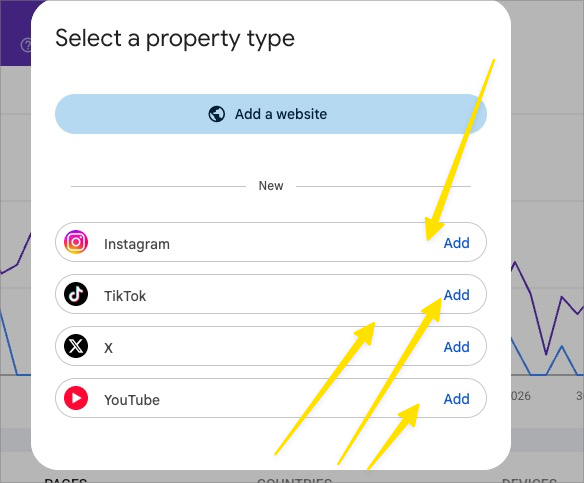
Google will now display the available property types.
Along with the traditional Add a website option, you will see supported social and video platforms.
At present, these include:
- TikTok
- X
- YouTube

Google Search Console now allows Instagram, TikTok, X and YouTube accounts to be added as Platform Properties.
4. Choose Your Platform
Click Add next to the platform you want to connect.
For example:
- YouTube
- TikTok
- X
5. Verify the Account
Follow Google's verification or authorisation process for the selected platform.
Make sure you are logged into the correct social media account before authorising access, particularly if you manage several client accounts.
6. Allow Search Console to Process the Data
Data may not appear immediately.
Initial processing can take some time, so an empty report immediately after adding the property does not necessarily indicate a problem.
Once processing is complete, you can start reviewing the available performance and Insights information.